Featured

Individual Project -Week 1

I’m reaching why the GP patient’s data record essential, because the doctor needs to look at the patient illness history and medication record to help the doctor to identify, which types of prescription to give to the patient.

Ingeneral, the patient data used to improving health care services, develop new medication and prevent the disease.

Week 2

In this week my reach will focus on the GP petient data security policy (the minimum requirement to protect the patient data to earn the patient trust) such as

login passoword

Encription data

Antivirus

backup data and the system updated

Also consider latest network hardware such as routes, or firewall implement the security command to reduce the risk of the malicious attack.

I started to write analysis focus on investigation and network vulnerability

Week 3

I watched on you tube data protection training video by ICO, data day hygiene. They are strongly advise do not used memory stick to stored personal data , because it is easy to lost or misused unless the memory stick encrypted.

Also send personal data by fax without checking if the number was correct very high risk as well.

When you are sharing personal information with other organization must only information relevant the purpose and content should be disclosed.

furthermore, whey are explain how to dispose the personal information should be measured by appropriate technical, because If you are just deleted the hard drive that is not proper way and the data can be retrieve. I continuance with literature review

Week 4

Group project;

We had group project meeting during the session. the meeting focus individual task in the group project and we are scheduled time to handed individual task. I handed my own analysis to group project as the group leader requested.

Week 5

I started to write the individual project discussion

We had group project discuss the report tiles and setup Microsoft team to able to communicate essay

Programming & Algorithm

Blogs

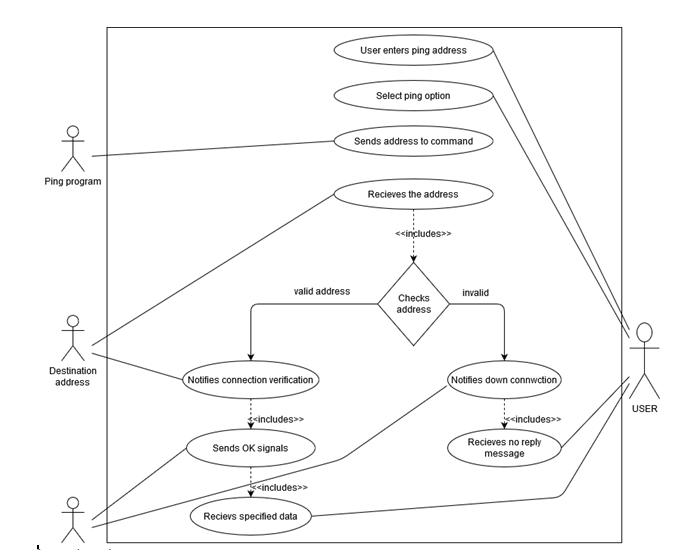
  1. Ping

Introduction

The network program was operated with the program version of Pycharm 2019.3.1 (professional edition)

Algorithm:

  1. Initiate
  2. Network commands test application is opened in a Window.
  3. Go to ping address for entering address and select option
  4. The command receives address from the program.
  5. The address is received by destination
  6. If the site is valid
  7. Destination sends 4 data packets with verification notification to the command
  8. OK signal is send by command to ping the program
  9. After that, the users receives four data packets
  10. Else
  11. Down notification is send by the command in the console program
  12. No reply message is received by actor
  13. Stop

Use Case Diagram:

Description: C:UsersRollingDownloadsfigure 1.png

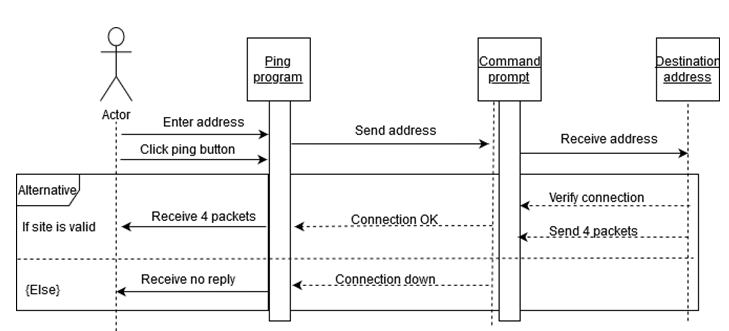
Sequence Diagram

Description: C:UsersRollingDownloadsSequence 1.png

TESTING TABLE:

Test case numberTest caseInputResult (Expected)Result (Actual)Required Screenshot
1.Application tested after making prototype192.168.1.1 –gateway www.youtube.com www.google.com  Ping reply from the destination location.ICMP message sent to remote location and received reply message without loss
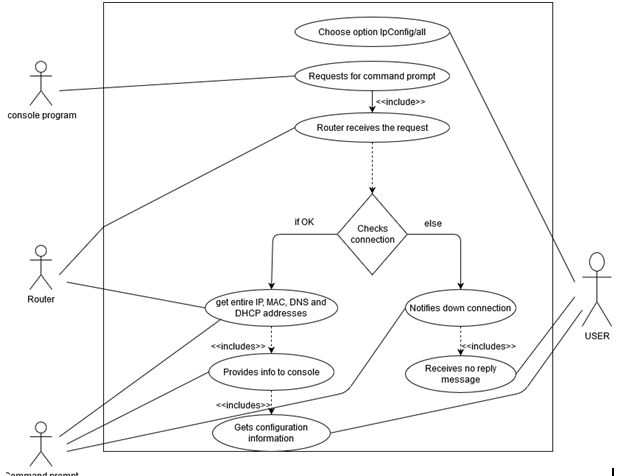
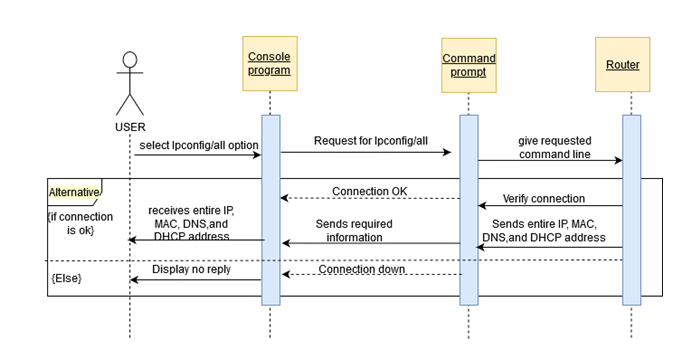
  • Ipconfig/all

Introduction

Pycharm 2019.3.1 was the version of program was used for the program on networking.

Algorithm

  1. Initiate
  2. Networking Command Test Application open
  3. The option Ipconfig/all is choose
  4.  Console program request for program
  5. Router receives the request command
  6. If there is right connection,
  7. The command prompt receives all the IP addresses like MAC, DNS and DHCP address
  8. The information is provided by command to console program
  9. The user view the configuration information displayed by the console
  10. If not,
  11. Connection down status notification is send by the command to console
  12. And no reply message is received by actor
  13. End

Use case Diagram

Description: C:UsersRollingDownloadsfigure 2.png

Sequence Diagram

Description: C:UsersRollingDownloadsSequence 2.png

TESTING TABLE:

Test case numberTest caseInputResult (Expected)Result (Actual)Required Screenshot
1.Command ipconfig /allNot requiredInformation about network hardwareResult displaying all the network information as IP, MAC, GATEWAY etc
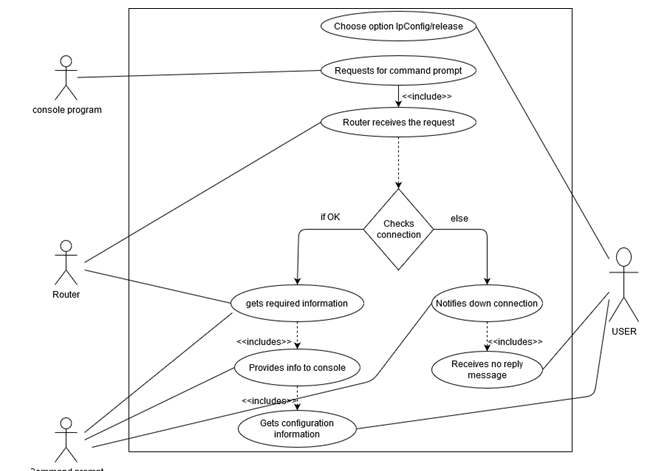
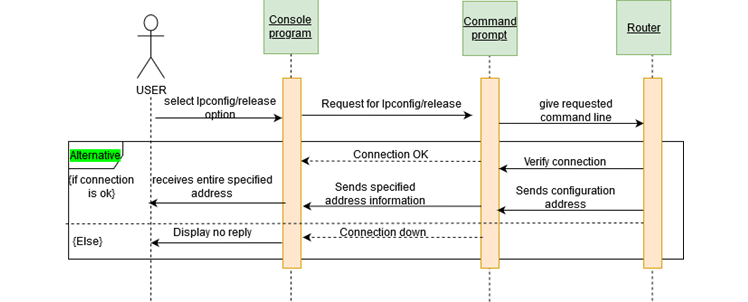
  • Ipconfig/release

Introduction

Pycharm 2019.3.1 was the version of program was used for the program on networking.

Algorithm

  1. Initiate
  2. Networking Command Test Application open
  3. The option Ipconfig/release is choose
  4. Console program request for program
  5. Router receives the request command
  6. If there is right connection,
  7. Router send transmit information to the command prompt
  8. The information is acknowledged by command prompt related with the request
  9. Command prompt gives information to command prompt and at the end to the user
  10. If not,
  11. Connection down status notification is send by the command to console
  12. And no reply message is received by actor
  13. End

Use case Diagram

Description: C:UsersRollingDownloadsfigure 3.png

Sequence Diagram

Description: C:UsersRollingDownloadsSequence 3.png

TESTING TABLE:

Test case numberTest caseInputResult (Expected)Result (Actual)Required Screenshot
1.Command ipconfig /releaseNot requiredRelease the current IP address received from DHCP serverErase current IP address
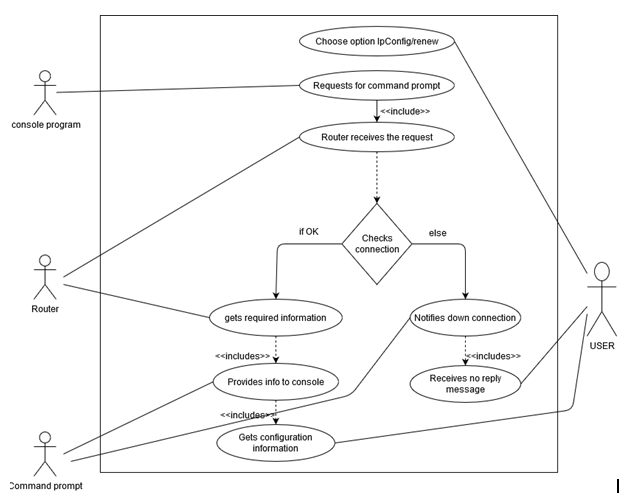
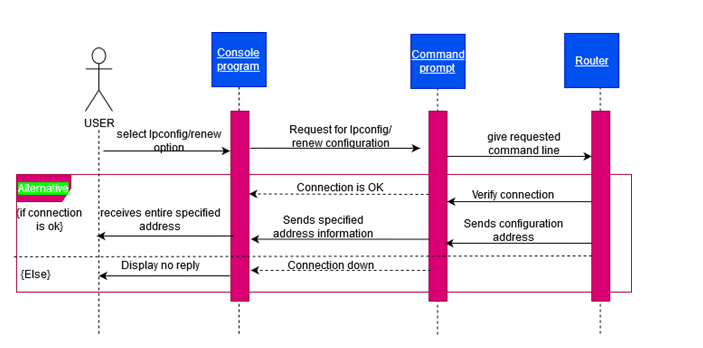
  • Ipconfig/renew

Introduction

Pycharm 2019.3.1 was the version of program was used for the program on networking.

Algorithm

  1. Initiate
    1. Networking Command Test Application  opens
    1. The option Ipconfig/renew is choose
    1. Console program request for program
    1. Router receives the request command
    1. If there is right connection,
      1. Router send transmit information to the command prompt
      1. The information is acknowledged by command prompt related with the request
      1. Command prompt gives information to command prompt and at the end to the user
    1. If not,
      1. Connection down status notification is send by the command prompt to console
      1. And no reply message is received by actor
    1. End

Use case Diagram

Description: C:UsersRollingDownloadsfigure 4.png

Sequence Diagram

Description: C:UsersRollingDownloadsSequence 4.png

TESTING TABLE:

Test case numberTest caseInputResult (Expected)Result (Actual)Required Screenshot
1.Command ipconfig /renewNot requiredRequest new IP address from DHCP serverFull DHCP “DORA” is performed by PC to get new IP address
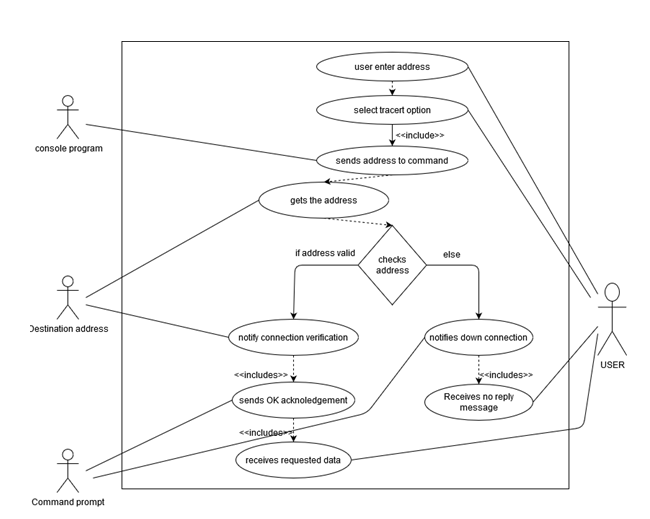
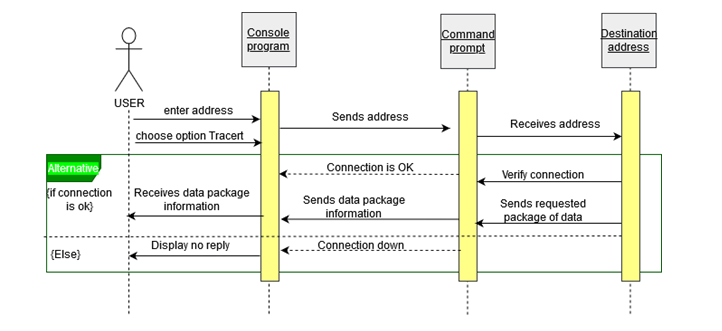
  • Tracert

Introduction

Pycharm 2019.3.1 was the version of program was used for the program on networking.

Algorithm

  1. Start
  2. Networking Command Test Application opens
  3. Enter address to enter address prompt
  4. Choose the option Tracert, which is in option 5
  5. Console program send addresses to the command
  6. Addresses is received by the destination
  7. For the valid site,
  8. Destination sends specific data packets with connection as verified with notification to command
  9. OK signal is send by command to program
  10. User receives the data packets
  • Else,
  • Connection down status notification is send by the command prompt to console
  • And no reply message is received by the actor
  • End

Use case Diagram

Description: C:UsersRollingDownloadsfigure 5.png

Sequence Diagram

Description: C:UsersRollingDownloadsSequence 5.png

TESTING TABLE:

Test case numberTest caseInputResult (Expected)Result (Actual)Required Screenshot
1.Command tracertwww.google.com   192.168.1.1Path to reach the input addressWithin the maximum distance of 30 hops path to reach the network address is displayed.
  • NetStat

Introduction

Pycharm 2019.3.1 was the version of program was used for the program on networking.

Algorithm

  1. Start
  2. Networking Command Test Application opens
  3. Enter address to enter address prompt
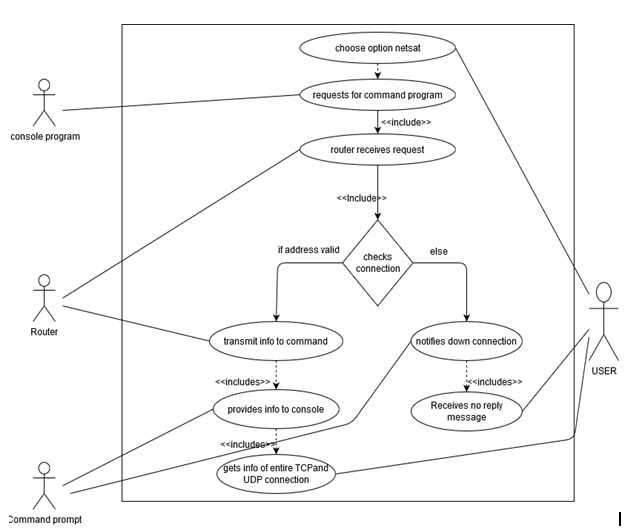
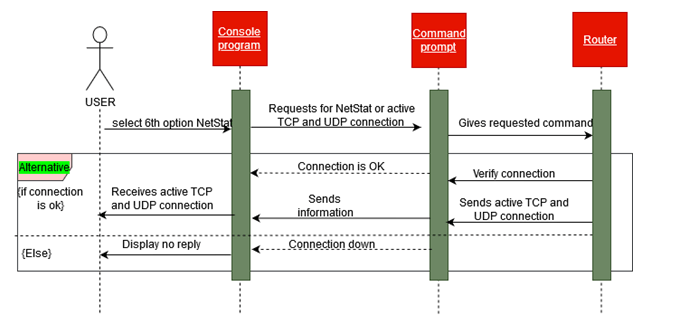
  4. Choose the option NetStat, which is in option 6
  5. Console program send addresses to the command
  6. Request command is received by router
  7. For the right connection,
    1. Router send transmit information to the command prompt
    1. The information is acknowledged by command prompt related with the request
    1. Command prompt gives information of all active TCP as well as UDP to console and at the end to the user
  • Else
    • Connection down status notification is send by the command prompt to console
    • And no reply message is received by the actor
  • End

Use case Diagram

Description: C:UsersRollingDownloadsfigure 7 .png

Sequence Diagram

Description: C:UsersRollingDownloadsSequence 6.png

TESTING TABLE:

Test case numberTest caseInputResult (Expected)Result (Actual)Required Screenshot
1.Command netstat -anNot requiredList of TCP and UDP connectionsAll the connection from and to the PC is displayed along with their IP and port number
  • Pathping

Introduction

Pycharm 2019.3.1 was the version of program was used for the program on networking.

Algorithm

  1. Start
  2. Networking Command Test Application opens
  3. Enter address to enter address prompt
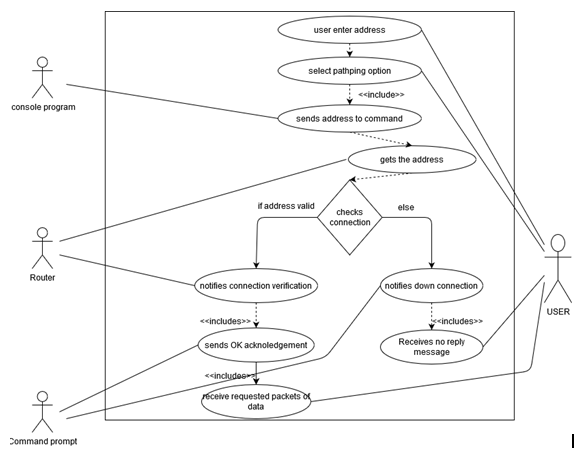
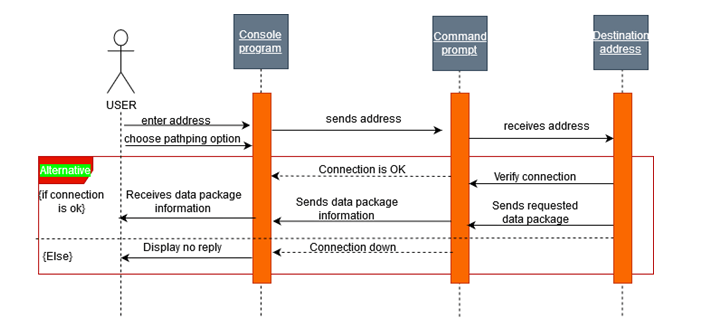
  4. Choose the option PathPing, which is in option 7
  5. Console program send addresses to the command
  6. Addresses is received by the destination
  7. For the valid site,
    1. Destination sends specific data packets with connection as verified with notification to command
  8. OK signal is send by command to program
  9. User receives the data packets
  • Else,
    • Connection down status notification is send by the command prompt to console
    • And no reply message is received by the actor
  • End

Use case Diagram

Description: C:UsersRollingDownloadsfigure 8.png

Sequence Diagram

Description: C:UsersRollingDownloadsSequence 7.png

TESTING TABLE:

Test case numberTest caseInputResult (Expected)Result (Actual)Required Screenshot
1.Command pathpingwww.google.com   192.168.1.1Entire path is pinged to test for live connectionsStatics of IP address and ping result is displayed

Modules required for making GUI application

import os

import tkinter as tk

Class definition

class Network_Application(tk.Frame):

# Init method for Class 

def __init__(self, masterRoot=None):

    super().__init__(masterRoot)


    # defining various class settings

    self.main = masterRoot 

    self.main.geometry("450x320")

    self.winfo_toplevel().title("*** Run Network Commands ***") 

    self.add_UI_Components() 

    self.pack() 


# function to add UI componets to root window

def add_UI_Components(self):


    self.layer1 = tk.Frame(self)  # initalizing a frame within a window

    self.layer2blue=tk.Frame(self,pady=10)

    self.layer2gr=tk.Frame(self)

    self.layer3=tk.Frame(self,pady=50)

    self.layer1.pack()

    self.layer2blue.pack()

    self.layer2gr.pack()

    self.layer3.pack(side="bottom")


    self.valueLabel = tk.Label(self.layer1,text="Input Value :=>> ") # initalizing Label to display text


    self.inputTextbox = tk.Entry(self.layer1)  # initalizing textbox 

    self.inputTextbox.focus() # moving cusor 


    self.valueLabel.grid(row=0,column=0,padx=0)  # defining grid layout for Components placement

    self.inputTextbox.grid(row=0,column=1,padx=30)


    self.req1 = tk.Label(self.layer1,text="Blue Commands require input") 


    self.req1.grid(row=1,column=0,pady=10)


    # initalizing input requiring command

    self.btn_ping = tk.Button(self.layer2blue, text="ping", command=self.cmd_ping,bg="blue")   

    self.btn_tracert = tk.Button(self.layer2blue, text="tracert", command=self.cmd_tracert,bg="blue")

    self.btn_pathping = tk.Button(self.layer2blue, text="pathping", command=self.cmd_pathping,bg="blue")


    # binding components to the frame by packing them in

    self.btn_ping.pack(side="left",padx=5,pady=5)

    self.btn_tracert.pack(side="left",padx=5,pady=5)

    self.btn_pathping.pack(side="left",padx=5,pady=5)


    self.req2 = tk.Label(self.layer1,text="Green Commands don't require input") 


    self.req2.grid(row=2,column=0,pady=10)


    # initalizing input not requiring commands

    self.btn_ipconfig = tk.Button(self.layer2gr, text="ipconfig /all", command=self.cmd_ipconfig_all,bg="green")

    self.btn_ipconfig_release = tk.Button(self.layer2gr, text="ipconfig /release", command=self.cmd_ipconfig_release,bg="green")

    self.btn_ipconfig_renew = tk.Button(self.layer2gr, text="ipconfig /renew", command=self.cmd_ipconfig_renew,bg="green")

    self.btn_netstat = tk.Button(self.layer2gr, text="netstat -an", command=self.cmd_netstat,bg="green")


    self.btn_ipconfig.pack(side="left",padx=5)

    self.btn_ipconfig_release.pack(side="left",padx=5)

    self.btn_ipconfig_renew.pack(side="left",padx=5)

    self.btn_netstat.pack(side="left",padx=5)


    # defining Exit button for the application

    self.exit = tk.Button(self.layer3, text="Exit Application", bg='red', command=self.main.destroy) 

    self.exit.pack(side="bottom",padx=10)

# function defination for all the network commands

def cmd_ping(self): 


    value=self.inputTextbox.get() 


    run_cmd = os.system('ping '+value) 

    if run_cmd == 0:

        print("Ping Command Success")

    else:

        print("Ping Command Failure")


    self.inputTextbox.delete(0,'end')  # to clear out the text box after command is executed


def cmd_tracert(self):

    value=self.inputTextbox.get()

    run_cmd = os.system("tracert "+value)

    self.inputTextbox.delete(0,'end')


def cmd_pathping(self):

    value=self.inputTextbox.get()

    run_cmd = os.system("pathping "+value)

    self.inputTextbox.delete(0,'end')


def cmd_ipconfig_all(self):

    run_cmd = os.system("ipconfig /all") 


def cmd_ipconfig_release(self):

    run_cmd = os.system("ipconfig /release")


def cmd_ipconfig_renew(self):

    run_cmd = os.system("ipconfig /renew")


def cmd_netstat(self):

    run_cmd = os.system("netstat -an")

root window instance creation

root = tk.Tk()

Network_Application class Instace creation

app = Network_Application(masterRoot=root)

Running the instance object in infinite loop

app.mainloop()

Individual project

Week 1

I’m reaching why the GP patient’s data record essential, because the doctor needs to look at the patient illness history and medication record to help the doctor to identify, which types of prescription to give to the patient.

Ingeneral, the patient data used to improving health care services, develop new medication and prevent the disease.

Week 2

In this week my reach will focus on the GP petient data security policy (the minimum requirement to protect the patient data to earn the patient trust) such as

login passoword

Encription data

Antivirus

backup data and the system updated

Also consider latest network hardware such as routes, or firewall implement the security command to reduce the risk of the malicious attack.

Week 3

I watched on you tube data protection training video by ICO, data day hygiene. They are strongly advise do not used memory stick to stored personal data , because it is easy to lost or misused unless the memory stick encrypted.

Also send personal data by fax without checking if the number was correct very high risk as well.

When you are sharing personal information with other organization must only information relevant the purpose and content should be disclosed.

furthermore, whey are explain how to dispose the personal information should be measured by appropriate technical, because If you are just deleted the hard drive that is not proper way and the data can be retrieve.

Week 4

Group project;

We had group project meeting during the session. the meeting focus individual task in the group project and we are scheduled time to handed individual task.

Individual project

Week 5

We had group project discuss the report tiles and setup Microsoft team to able to communicate essay 10 March 202

Programming & Algorithm

Blogs

  1. Ping

Introduction

The network program was operated with the program version of Pycharm 2019.3.1 (professional edition)

Algorithm:

  1. Initiate
  2. Network commands test application is opened in a Window.
  3. Go to ping address for entering address and select option
  4. The command receives address from the program.
  5. The address is received by destination
  6. If the site is valid
  7. Destination sends 4 data packets with verification notification to the command
  8. OK signal is send by command to ping the program
  9. After that, the users receives four data packets
  10. Else
  11. Down notification is send by the command in the console program
  12. No reply message is received by actor
  13. Stop

Use Case Diagram:

Description: C:\Users\Rolling\Downloads\figure 1.png

Sequence Diagram

Description: C:\Users\Rolling\Downloads\Sequence 1.png

TESTING TABLE:

Test case numberTest caseInputResult (Expected)Result (Actual)Required Screenshot
1.Application tested after making prototype192.168.1.1 –gateway www.youtube.com www.google.com  Ping reply from the destination location.ICMP message sent to remote location and received reply message without loss
  • Ipconfig/all

Introduction

Pycharm 2019.3.1 was the version of program was used for the program on networking.

Algorithm

  1. Initiate
  2. Networking Command Test Application open
  3. The option Ipconfig/all is choose
  4.  Console program request for program
  5. Router receives the request command
  6. If there is right connection,
  7. The command prompt receives all the IP addresses like MAC, DNS and DHCP address
  8. The information is provided by command to console program
  9. The user view the configuration information displayed by the console
  10. If not,
  11. Connection down status notification is send by the command to console
  12. And no reply message is received by actor
  13. End

Use case Diagram

Description: C:\Users\Rolling\Downloads\figure 2.png

Sequence Diagram

Description: C:\Users\Rolling\Downloads\Sequence 2.png

TESTING TABLE:

Test case numberTest caseInputResult (Expected)Result (Actual)Required Screenshot
1.Command ipconfig /allNot requiredInformation about network hardwareResult displaying all the network information as IP, MAC, GATEWAY etc
  • Ipconfig/release

Introduction

Pycharm 2019.3.1 was the version of program was used for the program on networking.

Algorithm

  1. Initiate
  2. Networking Command Test Application open
  3. The option Ipconfig/release is choose
  4. Console program request for program
  5. Router receives the request command
  6. If there is right connection,
  7. Router send transmit information to the command prompt
  8. The information is acknowledged by command prompt related with the request
  9. Command prompt gives information to command prompt and at the end to the user
  10. If not,
  11. Connection down status notification is send by the command to console
  12. And no reply message is received by actor
  13. End

Use case Diagram

Description: C:\Users\Rolling\Downloads\figure 3.png

Sequence Diagram

Description: C:\Users\Rolling\Downloads\Sequence 3.png

TESTING TABLE:

Test case numberTest caseInputResult (Expected)Result (Actual)Required Screenshot
1.Command ipconfig /releaseNot requiredRelease the current IP address received from DHCP serverErase current IP address
  • Ipconfig/renew

Introduction

Pycharm 2019.3.1 was the version of program was used for the program on networking.

Algorithm

  1. Initiate
    1. Networking Command Test Application  opens
    1. The option Ipconfig/renew is choose
    1. Console program request for program
    1. Router receives the request command
    1. If there is right connection,
      1. Router send transmit information to the command prompt
      1. The information is acknowledged by command prompt related with the request
      1. Command prompt gives information to command prompt and at the end to the user
    1. If not,
      1. Connection down status notification is send by the command prompt to console
      1. And no reply message is received by actor
    1. End

Use case Diagram

Description: C:\Users\Rolling\Downloads\figure 4.png

Sequence Diagram

Description: C:\Users\Rolling\Downloads\Sequence 4.png

TESTING TABLE:

Test case numberTest caseInputResult (Expected)Result (Actual)Required Screenshot
1.Command ipconfig /renewNot requiredRequest new IP address from DHCP serverFull DHCP “DORA” is performed by PC to get new IP address
  • Tracert

Introduction

Pycharm 2019.3.1 was the version of program was used for the program on networking.

Algorithm

  1. Start
  2. Networking Command Test Application opens
  3. Enter address to enter address prompt
  4. Choose the option Tracert, which is in option 5
  5. Console program send addresses to the command
  6. Addresses is received by the destination
  7. For the valid site,
  8. Destination sends specific data packets with connection as verified with notification to command
  9. OK signal is send by command to program
  10. User receives the data packets
  • Else,
  • Connection down status notification is send by the command prompt to console
  • And no reply message is received by the actor
  • End

Use case Diagram

Description: C:\Users\Rolling\Downloads\figure 5.png

Sequence Diagram

Description: C:\Users\Rolling\Downloads\Sequence 5.png

TESTING TABLE:

Test case numberTest caseInputResult (Expected)Result (Actual)Required Screenshot
1.Command tracertwww.google.com   192.168.1.1Path to reach the input addressWithin the maximum distance of 30 hops path to reach the network address is displayed.
  • NetStat

Introduction

Pycharm 2019.3.1 was the version of program was used for the program on networking.

Algorithm

  1. Start
  2. Networking Command Test Application opens
  3. Enter address to enter address prompt
  4. Choose the option NetStat, which is in option 6
  5. Console program send addresses to the command
  6. Request command is received by router
  7. For the right connection,
    1. Router send transmit information to the command prompt
    1. The information is acknowledged by command prompt related with the request
    1. Command prompt gives information of all active TCP as well as UDP to console and at the end to the user
  • Else
    • Connection down status notification is send by the command prompt to console
    • And no reply message is received by the actor
  • End

Use case Diagram

Description: C:\Users\Rolling\Downloads\figure 7 .png

Sequence Diagram

Description: C:\Users\Rolling\Downloads\Sequence 6.png

TESTING TABLE:

Test case numberTest caseInputResult (Expected)Result (Actual)Required Screenshot
1.Command netstat -anNot requiredList of TCP and UDP connectionsAll the connection from and to the PC is displayed along with their IP and port number
  • Pathping

Introduction

Pycharm 2019.3.1 was the version of program was used for the program on networking.

Algorithm

  1. Start
  2. Networking Command Test Application opens
  3. Enter address to enter address prompt
  4. Choose the option PathPing, which is in option 7
  5. Console program send addresses to the command
  6. Addresses is received by the destination
  7. For the valid site,
    1. Destination sends specific data packets with connection as verified with notification to command
  8. OK signal is send by command to program
  9. User receives the data packets
  • Else,
    • Connection down status notification is send by the command prompt to console
    • And no reply message is received by the actor
  • End

Use case Diagram

Description: C:\Users\Rolling\Downloads\figure 8.png

Sequence Diagram

Description: C:\Users\Rolling\Downloads\Sequence 7.png

TESTING TABLE:

Test case numberTest caseInputResult (Expected)Result (Actual)Required Screenshot
1.Command pathpingwww.google.com   192.168.1.1Entire path is pinged to test for live connectionsStatics of IP address and ping result is displayed

Modules required for making GUI application

import os

import tkinter as tk

Class definition

class Network_Application(tk.Frame):

# Init method for Class 

def __init__(self, masterRoot=None):

    super().__init__(masterRoot)


    # defining various class settings

    self.main = masterRoot 

    self.main.geometry("450x320")

    self.winfo_toplevel().title("*** Run Network Commands ***") 

    self.add_UI_Components() 

    self.pack() 


# function to add UI componets to root window

def add_UI_Components(self):


    self.layer1 = tk.Frame(self)  # initalizing a frame within a window

    self.layer2blue=tk.Frame(self,pady=10)

    self.layer2gr=tk.Frame(self)

    self.layer3=tk.Frame(self,pady=50)

    self.layer1.pack()

    self.layer2blue.pack()

    self.layer2gr.pack()

    self.layer3.pack(side="bottom")


    self.valueLabel = tk.Label(self.layer1,text="Input Value :=>> ") # initalizing Label to display text


    self.inputTextbox = tk.Entry(self.layer1)  # initalizing textbox 

    self.inputTextbox.focus() # moving cusor 


    self.valueLabel.grid(row=0,column=0,padx=0)  # defining grid layout for Components placement

    self.inputTextbox.grid(row=0,column=1,padx=30)


    self.req1 = tk.Label(self.layer1,text="Blue Commands require input") 


    self.req1.grid(row=1,column=0,pady=10)


    # initalizing input requiring command

    self.btn_ping = tk.Button(self.layer2blue, text="ping", command=self.cmd_ping,bg="blue")   

    self.btn_tracert = tk.Button(self.layer2blue, text="tracert", command=self.cmd_tracert,bg="blue")

    self.btn_pathping = tk.Button(self.layer2blue, text="pathping", command=self.cmd_pathping,bg="blue")


    # binding components to the frame by packing them in

    self.btn_ping.pack(side="left",padx=5,pady=5)

    self.btn_tracert.pack(side="left",padx=5,pady=5)

    self.btn_pathping.pack(side="left",padx=5,pady=5)


    self.req2 = tk.Label(self.layer1,text="Green Commands don't require input") 


    self.req2.grid(row=2,column=0,pady=10)


    # initalizing input not requiring commands

    self.btn_ipconfig = tk.Button(self.layer2gr, text="ipconfig /all", command=self.cmd_ipconfig_all,bg="green")

    self.btn_ipconfig_release = tk.Button(self.layer2gr, text="ipconfig /release", command=self.cmd_ipconfig_release,bg="green")

    self.btn_ipconfig_renew = tk.Button(self.layer2gr, text="ipconfig /renew", command=self.cmd_ipconfig_renew,bg="green")

    self.btn_netstat = tk.Button(self.layer2gr, text="netstat -an", command=self.cmd_netstat,bg="green")


    self.btn_ipconfig.pack(side="left",padx=5)

    self.btn_ipconfig_release.pack(side="left",padx=5)

    self.btn_ipconfig_renew.pack(side="left",padx=5)

    self.btn_netstat.pack(side="left",padx=5)


    # defining Exit button for the application

    self.exit = tk.Button(self.layer3, text="Exit Application", bg='red', command=self.main.destroy) 

    self.exit.pack(side="bottom",padx=10)

# function defination for all the network commands

def cmd_ping(self): 


    value=self.inputTextbox.get() 


    run_cmd = os.system('ping '+value) 

    if run_cmd == 0:

        print("Ping Command Success")

    else:

        print("Ping Command Failure")


    self.inputTextbox.delete(0,'end')  # to clear out the text box after command is executed


def cmd_tracert(self):

    value=self.inputTextbox.get()

    run_cmd = os.system("tracert "+value)

    self.inputTextbox.delete(0,'end')


def cmd_pathping(self):

    value=self.inputTextbox.get()

    run_cmd = os.system("pathping "+value)

    self.inputTextbox.delete(0,'end')


def cmd_ipconfig_all(self):

    run_cmd = os.system("ipconfig /all") 


def cmd_ipconfig_release(self):

    run_cmd = os.system("ipconfig /release")


def cmd_ipconfig_renew(self):

    run_cmd = os.system("ipconfig /renew")


def cmd_netstat(self):

    run_cmd = os.system("netstat -an")

root window instance creation

root = tk.Tk()

Network_Application class Instace creation

app = Network_Application(masterRoot=root)

Running the instance object in infinite loop

app.mainloop()

Programming And Algorithm

This is python coding for Network commands

import tkinter as windowToolKitInterface
import os

def routeCommand():
result= os.system("route")

def netStatCommand():
result= os.system("netstat")
print(result)

def nbtStatCommand():
result = os.system("nbtstat ")
print(result)

def tracertCommand():
result = os.system("tracert ")
print(result)

def pathPingCommand():

result = os.system("pathping ")
print(result)

def ipconfigCommand():
result = os.system("ipconfig")
print(result)


myWindow = windowToolKitInterface.Tk()

myWindow.title("Networking program")
myWindow.configure(background='green')
myWindow.geometry("300x170")

myWindowFrame = windowToolKitInterface.Frame(myWindow)
myWindowFrame.pack()

routeButton = windowToolKitInterface.Button(myWindowFrame, text="route", fg="black",command=routeCommand)
netStatButton= windowToolKitInterface.Button(myWindowFrame, text="Netstat", fg = "black", command=netStatCommand)
nbtStatButton= windowToolKitInterface.Button(myWindowFrame, text="Nbtstat", fg = "black", command=nbtStatCommand)
tracertButton = windowToolKitInterface.Button(myWindowFrame, text="tracert", fg="black",command=tracertCommand)
pathpinButton = windowToolKitInterface.Button(myWindowFrame, text="pathping", fg="black",command=pathPingCommand)
ipconfigButton = windowToolKitInterface.Button(myWindowFrame, text="ipconfig", fg="black",command=ipconfigCommand)


routeButton.pack(), \
netStatButton.pack()
nbtStatButton.pack()
tracertButton.pack()
pathpinButton.pack()
ipconfigButton.pack()

myWindow.mainloop()
import tkinter as windowToolKitInterface
import os

def pingAddress():
myEntryString = str(myEntry.get())
result= os.system("ping " + myEntryString)

def routeCommand():
result = os.system("route")

def tracertCommand():
result = os.system("tracert ")
print(result)

def pathPingCommand():

result = os.system("pathping ")
print(result)

def ipconfigCommand():
result = os.system("ipconfig")
print(result)

if("result==0"):
print("success")
else:
print("failure")


myWindow = windowToolKitInterface.Tk()

myWindow.title("Network Programming")
myWindow.configure(background='magenta')
myWindow.geometry("300x200")
myWindowFrame = windowToolKitInterface.Frame(myWindow)

myLabel=windowToolKitInterface.Label(myWindow, text="Enter Address")

myEntry = windowToolKitInterface.Entry(myWindowFrame)

myPingButton = windowToolKitInterface.Button( myWindowFrame, text="Ping An Address", fg="black", command=pingAddress)
routeButton = windowToolKitInterface.Button(myWindowFrame, text="route", fg="black",command=routeCommand)
tracertButton = windowToolKitInterface.Button(myWindowFrame, text="tracert", fg="black",command=tracertCommand)
pathpinButton = windowToolKitInterface.Button(myWindowFrame, text="pathping", fg="black",command=pathPingCommand)
ipconfigButton = windowToolKitInterface.Button(myWindowFrame, text="ipconfig", fg="black",command=ipconfigCommand)


myLabel.pack()
myEntry.pack()
myPingButton.pack()
routeButton.pack()
tracertButton.pack()
pathpinButton.pack()
ipconfigButton.pack()


myWindowFrame.pack()

myWindow.mainloop()

blogs

Screen shot for five network command using pytharm

Introduce Yourself (Example Post)

This is an example post, originally published as part of Blogging University. Enroll in one of our ten programs, and start your blog right.

You’re going to publish a post today. Don’t worry about how your blog looks. Don’t worry if you haven’t given it a name yet, or you’re feeling overwhelmed. Just click the “New Post” button, and tell us why you’re here.

Why do this?

  • Because it gives new readers context. What are you about? Why should they read your blog?
  • Because it will help you focus you own ideas about your blog and what you’d like to do with it.

The post can be short or long, a personal intro to your life or a bloggy mission statement, a manifesto for the future or a simple outline of your the types of things you hope to publish.

To help you get started, here are a few questions:

  • Why are you blogging publicly, rather than keeping a personal journal?
  • What topics do you think you’ll write about?
  • Who would you love to connect with via your blog?
  • If you blog successfully throughout the next year, what would you hope to have accomplished?

You’re not locked into any of this; one of the wonderful things about blogs is how they constantly evolve as we learn, grow, and interact with one another — but it’s good to know where and why you started, and articulating your goals may just give you a few other post ideas.

Can’t think how to get started? Just write the first thing that pops into your head. Anne Lamott, author of a book on writing we love, says that you need to give yourself permission to write a “crappy first draft”. Anne makes a great point — just start writing, and worry about editing it later.

When you’re ready to publish, give your post three to five tags that describe your blog’s focus — writing, photography, fiction, parenting, food, cars, movies, sports, whatever. These tags will help others who care about your topics find you in the Reader. Make sure one of the tags is “zerotohero,” so other new bloggers can find you, too.
Design a site like this with WordPress.com
Get started